Face Suggestions
Face recognition is deliberately cautious. A face assigned to the wrong person is far harder to untangle than one it never assigned. The mistake spreads into search results, memories, and any Shared Space the photo reaches, and undoing it means finding every place it went. So recognition holds a tight threshold and leaves anything short of it unassigned.
The cost of that caution is a long tail of near-misses in every library. The profile shot, the one in bad light, the one from four years ago: all unassigned, while the person they belong to is named and obvious.
Face Suggestions is the other half of that trade. Gallery collects the faces that were almost confident enough and brings them back to you on the person they most likely belong to, so you can make the call the model would not.
Suggestions handle the faces recognition skipped. For the ones it got wrong (clusters contaminated with another person's photos), see Face Cleanup. Both write to the same verdict layer, so a decision made in either is respected by the other.
Reviewing suggestions
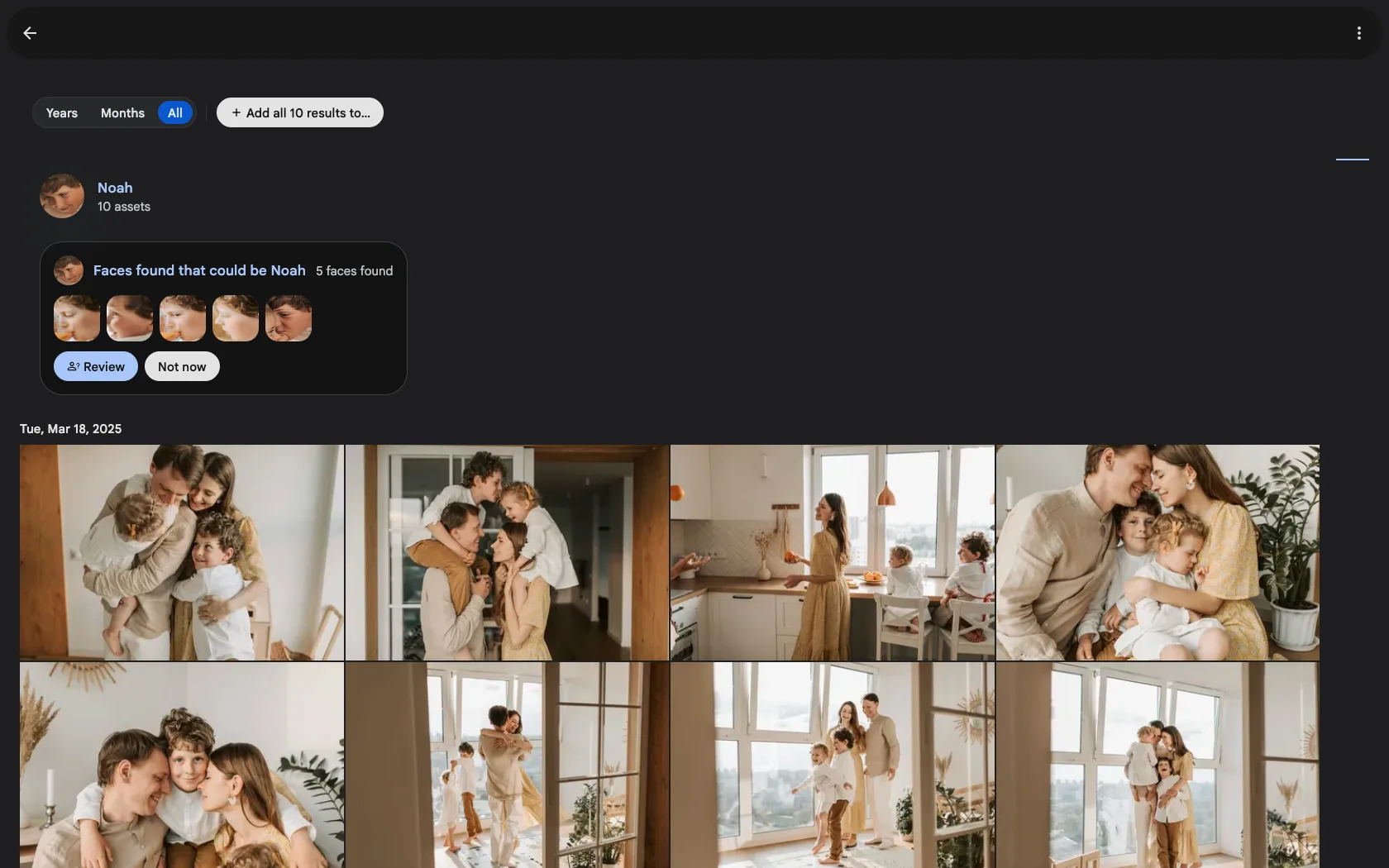
Open a named person. If there are near-misses waiting, a banner sits above their photos, Faces found that could be Anna, with a preview of the crops and a Review button. Not now hides the banner for the session without deciding anything.
Review shows one face at a time. Each one is presented in the photo it came from, so you keep the context a bare crop throws away, with a Known photo of the person beside it for comparison.
| Action | What it does |
|---|---|
| Same person | Assigns the face to this person, and improves future matching |
| Different person | Records that this face is not this person. The face stays unassigned and is never suggested for them again |
| Ignore face | Suppresses the suggestion without judging the match: for crops not worth anyone's time, like a stranger in the background or a face on a poster |
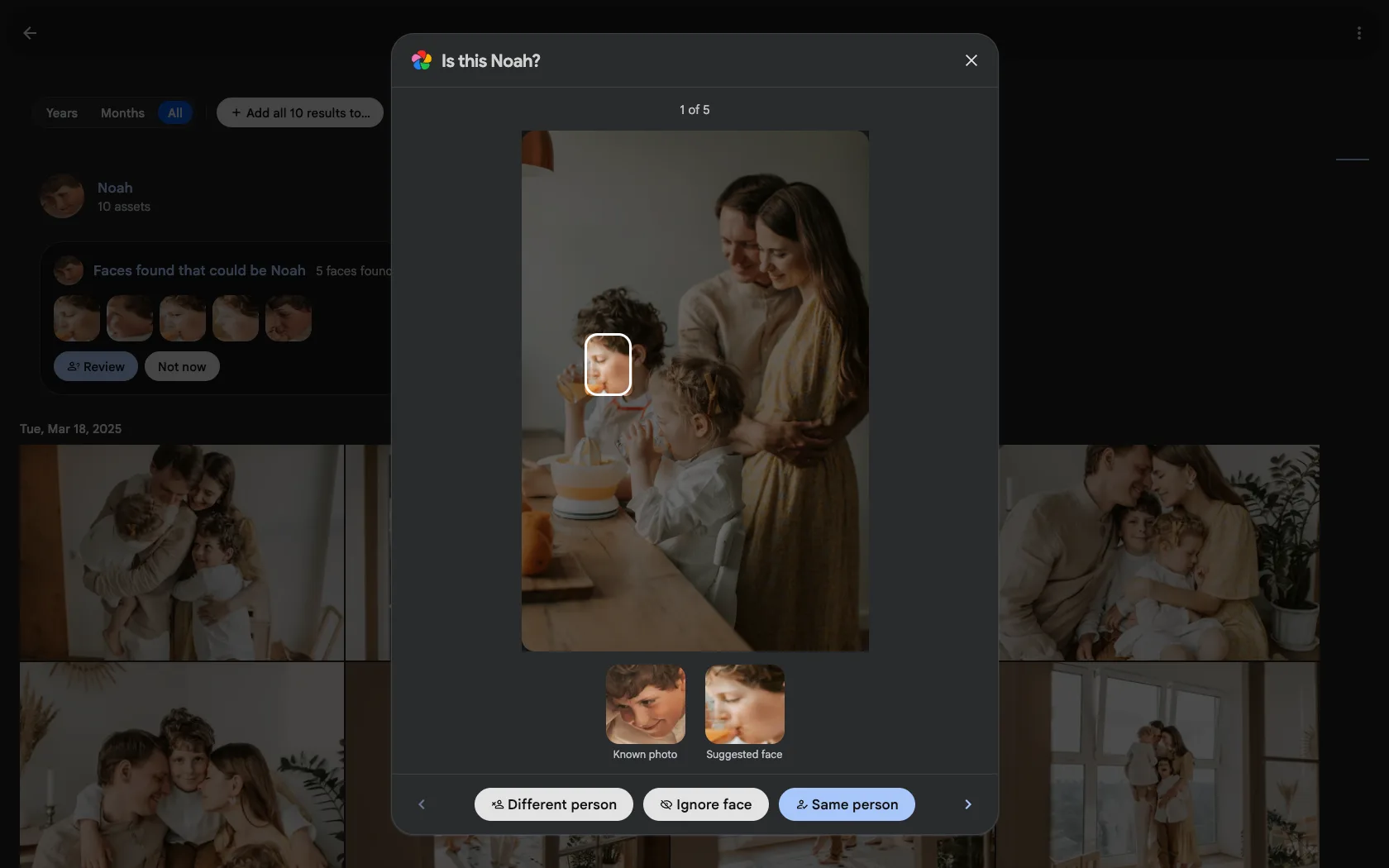
The difference between the last two is worth knowing. Different person is a real verdict: it is stamped against the person's identity, so it answers "not this person" everywhere that identity is checked, including rows you were not looking at. Ignore face only stops the asking.
Dismissing a suggestion hides the suggestion, not the face. If a future, more confident match brings that same face inside the automatic-recognition threshold, it can still be auto-assigned. That is by design: saying "different person" once should never permanently block normal recognition.
Shared Spaces
People in a Shared Space work the same way, whether you open the person from inside the space or from the main People view.
Owners and Editors get suggestions, because they are the members who can assign faces. Viewers get none, since a queue of questions they cannot answer would only be noise.
A space person is scanned only when that space has face recognition enabled.
What gets scanned
A person is only considered if it:
- has a name,
- is not hidden, and
- is a person rather than a pet.
Configuration
Suggestions are on by default. The first library scan is queued for you and there is no job to run by hand; from then on suggestions stay current as new photos are processed. You can watch the work in Administration → Jobs.
The toggle lives at Administration → Settings → Machine Learning → Facial Recognition, under Enable face suggestions.
Suggestion max distance must be greater than Maximum recognition distance. A smaller value can never match anything, because every candidate would already have been auto-assigned, so the settings page refuses to save it. Suggestions also require facial recognition itself to stay enabled.
Widening the suggestion distance does not rescan on its own. To pick up the newly-eligible faces, run the Face suggestion maintenance job.
Upgrading an existing library
The first time the server starts on a version with suggestions, it queues one library-wide catch-up scan, so an existing library does not need a trip to the Jobs page either. That scan runs once per instance on the People backfill queue, where it is visible and pausable like any other job.
It is safe to let it run even if you were already using suggestions: a re-scan never duplicates a pending suggestion and never re-asks about a face you have already decided.
Your existing setting is preserved:
- If you had already switched suggestions on, they stay on.
- If you had set a suggestion distance too low to ever match anything, that is read as "off" and left off. Turn the toggle on to start using the feature.
- Only instances that never configured the setting at all pick up the new on-by-default.
Turning suggestions off and on again
Switching the feature off hides pending suggestions everywhere but deletes nothing. Every decision you have already made is durable: faces you assigned stay assigned, and faces you rejected stay rejected.
Switching it back on re-queues a scan, and your earlier decisions are still honoured: a face you said "different person" to is not proposed for that person again.
Anything left pending when you switched off is re-validated before it is shown again, so a suggestion that went stale in the meantime (the face was assigned to someone, the photo was deleted, the suggestion distance was narrowed) drops out quietly instead of coming back.
See also
- Facial Recognition: how detection and clustering work, and how to tune them
- Face Cleanup: repairing clusters that were assigned incorrectly
- Shared Spaces: roles and what each one can do